

📘 Introduction

n this hands-on tutorial, we’ll walk you step-by-step through the Dagster UI and show you where to find your dbt models, along with important details such as column descriptions, SQL code, and data lineage.

✅ Prerequisites

🐍☑️ Installed Python
📦☑️Installed Pip
🌐☑️ Created a virtual environment (venv)
🗂️☑️ A dbt project set up
🧪☑️ Existing dbt models defined in your models/ directory
🐙☑️ Created a Dagster project within your dbt project
🚀☑️ Run Dagster with your dbt project locally

🗂️ Models in our dbt project

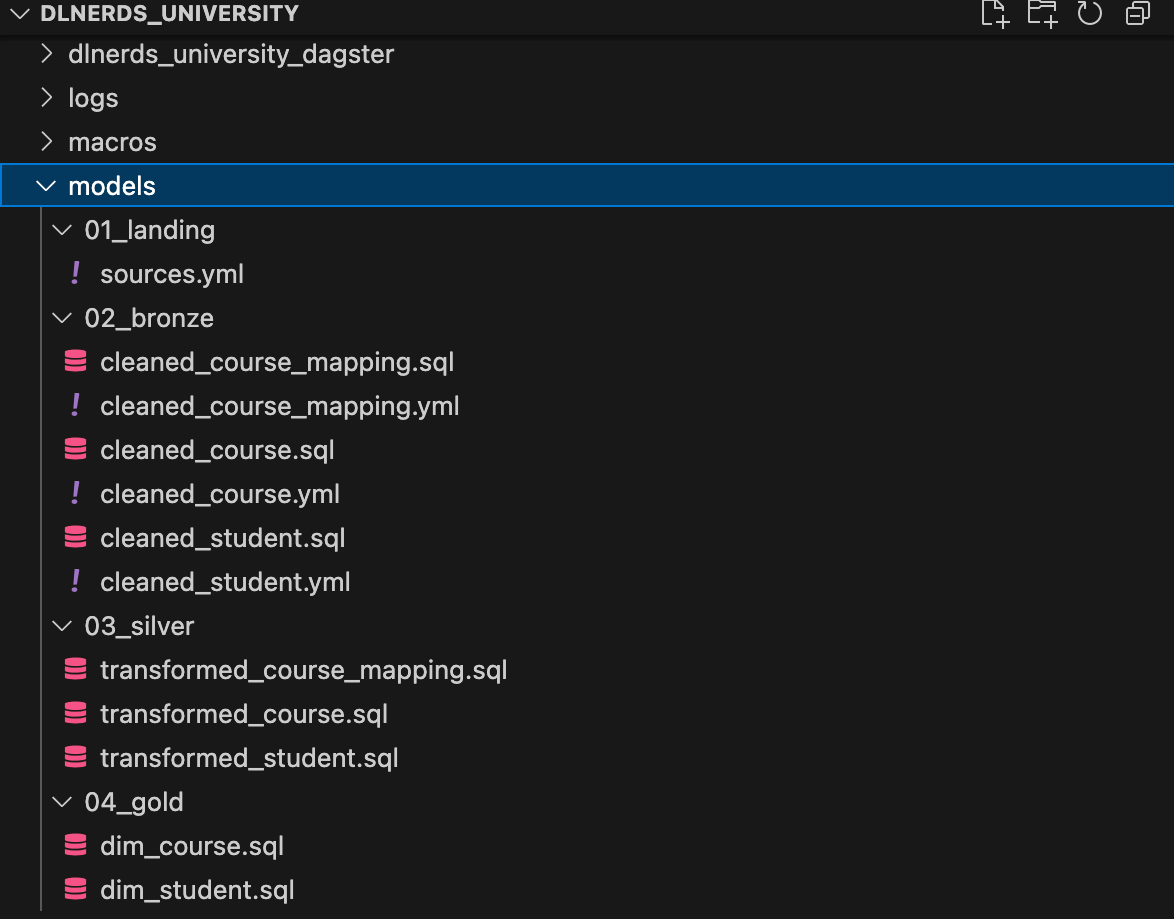
In this tutorial, we’re working with a dbt project called dlnerds_university. Inside it, we’ve already created a Dagster project named dlnerds_university_dagster. The project contains several dbt models that we’ll explore through the Dagster UI.

CTA Image

If you’d like to dive deeper into dbt (data build tool), our book Building Modern Data Pipelines with dbt: From Raw Data to Gold Standard with the Medallion Architecture provides a hands-on guide to designing modern data pipelines. It covers dbt’s core concepts and best practices, including building Bronze, Silver, and Gold layers with the Medallion Architecture. It also serves as a hands-on study guide for the dbt Analytics Engineering Certification.

View on Amazon

💻 Explore Models in the Dagster UI

After running, the Dagster UI is available on http://127.0.0.1:3000. Open the page in your Browser and go to Assets.

You can view this post with the tier: Academy Membership

Join academy now to read the post and get access to the full library of premium posts for academy members only.

Join Academy Already have an account? Sign In